Games
Games  Live Casino
  Promotions
  Search
  Profile
Lucky7even Casino App: Download for Android, iOS & Desktop in Australia
Lucky7even does not have a classic native app listed on the Play Store, but it has a PWA, a web-based platform that looks and functions like an app that players in Australia can use. Lucky7even provides a PWA version for iOS and Android devices. Both run through a secure web environment, but come as a shortcut icon on your device screen. It offers a faster, more convenient way to start gaming sessions or access other key features.
| Platform | Access Method | Store Availability | Install Required | Full Feature Access |
|---|---|---|---|---|
| Android | PWA | No | Yes | Yes |
| IOS | PWA | No | Yes | Yes |
| Desktop | PWA shortcut | No | Yes | Yes |
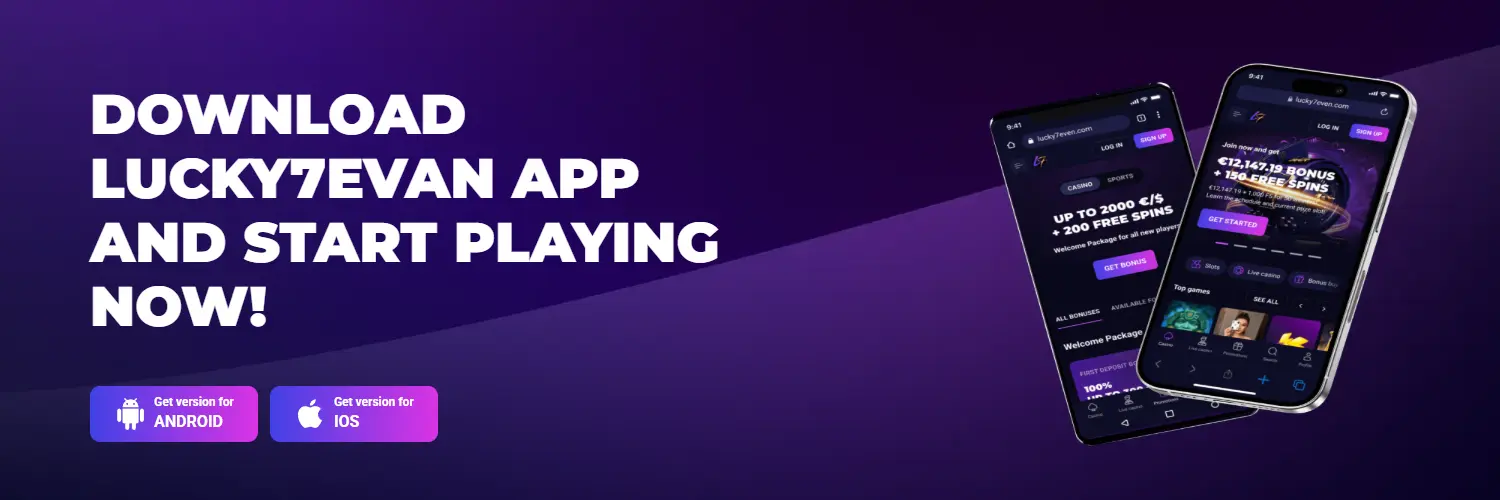
Does the Casino Have a Mobile App?
No, the casino does not have a native application. Instead, the Lucky 7 Casino app is a PWA. This technology is better because it lets you start gaming in seconds from your home screen, offers a familiar lobby structure and gives you access to all features without a large installation or frequent manual updates.
| Feature | PWA | Native Software |
|---|---|---|
| Installation path | You use the Add to Home Screen command | App Store or Play Store |
| Storage requirement | Uses limited browser cache | Requires 50MB to hundreds of MBs to download and much more storage for updates |
| Updates | Instant background update when you launch the Lucky7even app | Requires regular manual approvals to update the app from the app store |
| Performance | Browser HTML5 execution speed | Uses local GPU hardware rendering |
How to Download Lucky7even Casino App: All Platforms
Downloading the Lucky7even mobile platform varies by platform.
Lucky7even Android (Chrome)
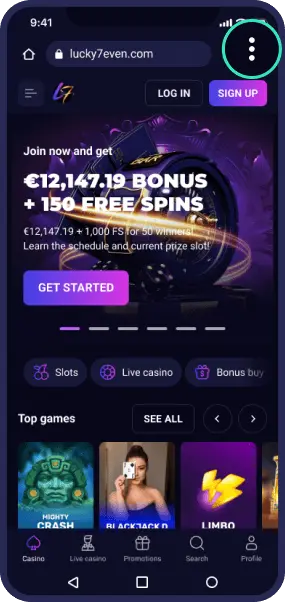
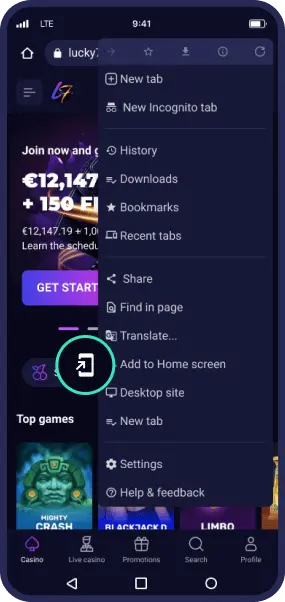
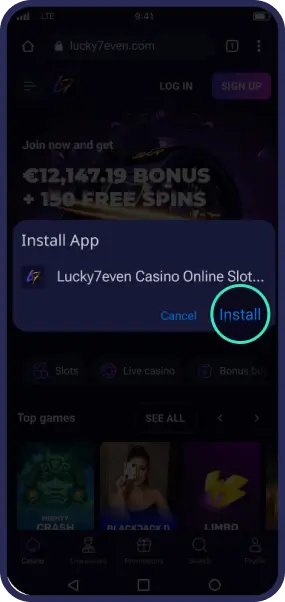
Open the site in Chrome. Tap the three-dot menu icon in the top-right corner, then select Add to Home screen (or Install app, depending on your Chrome version). Confirm by tapping Add or Install. The app icon appears on your home screen — tap it to log in.
Lucky7even iOS (Safari)
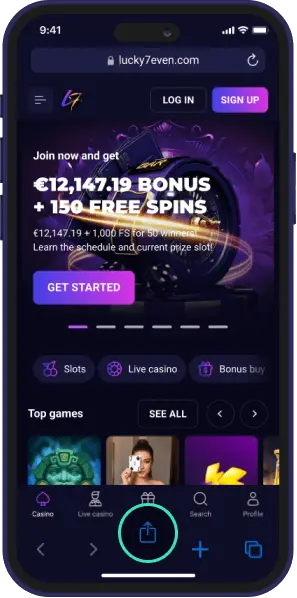
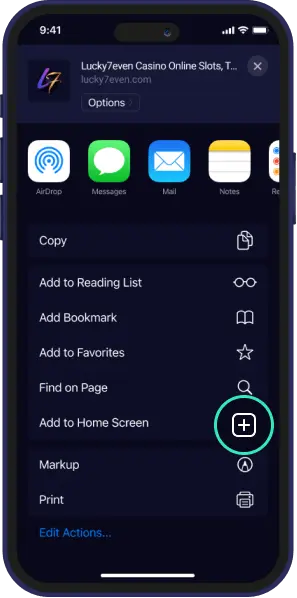
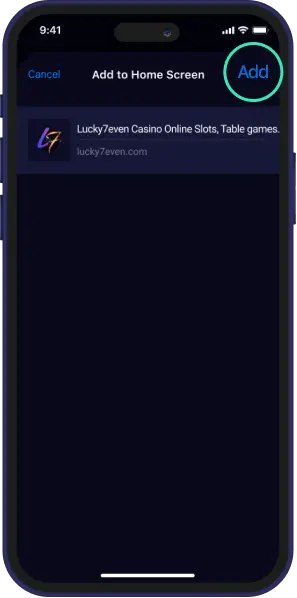
Open the site in Safari. Tap the Share icon (the square with an arrow pointing up) in the browser toolbar, then select Add to Home Screen. Tap Add to confirm. The app icon appears on your home screen — tap it to log in.
Desktop
With the casino site open in your Chrome browser, click the computer monitor with a down arrow at the end of the URL to create a PWA shortcut.
Lucky7even Mobile App Features
The Lucky7even app for Android and iOS brings a full-function desktop on your mobile. There is a small difference in the layout, but games, bonuses and features are similar across devices.
| Feature | Detail |
|---|---|
| Game library | 7,000 titles |
| Live casino | 400+, including blackjack, roulette, baccarat, poker and live shows |
| Payments | Bitcoin, Binance, Ethereum, USDT, Visa, Mastercard, Neteller & more |
| Security | SSL encryption, 2FA, login password |
| Responsible gambling | Deposit, loss and bet limits, self-exclusion, session limit |
| Performance | Fast loading |
| User interface | Touch-optimised, intuitive |
Mobile Game Selection
Pokies, live casino, instant win and table games are available on the Lucky7even Casino app. Here are examples:
- Evolution: Baccarat Lobby, Squeeze Baccarat, Blackjack Classic, Blackjack Diamond VIP, First Person Blackjack.
- Pragmatic Play: American Blackjack, High Flyer, Asgard, Bigger Bass Bonanza, Buffalo King Megaways.
- Novomatic: Always Hot, Banana Splash, Book of Ra, Chicago, Faust.
- Netgame: Book of Nile, BUCKS, Dolphin Queen, Mriya, Squid Slot.
- BGaming: Plinko 2, Aviamasters, Aztec Clusters, Balloon Mania, Big Boat Big Catch.
Lucky7even App vs Browser
The Lucky7even Casino app and browser version provide access to the same features and core functions like depositing funds and claiming bonuses, but there are a few operational differences.
| Parameter | App | Browser |
|---|---|---|
| Loading speed | Fast because key assets are cached locally after the first launch, so the app skips re-downloading them each time | Slower because elements are fetched fresh via HTML5 on every visit, with no local cache to speed things up |
| Stability | The Lucky7even PWA is optimised for your phone | Prone to lag or crashes if you have too many open tabs |
| Notifications | Real-time push notifications for bonuses, promos, new releases | No push notifications — updates only via email or in-browser alerts |
| Data and battery usage | Low data usage after downloading, but can drain your battery fast due to background processing | Higher data usage per session, but lighter on your battery |
The mobile app functionality focuses on touch control with direct access to casino sections, which makes it an ideal option, but you can use a desktop if you want to play more than one game at a time.
Mobile Security and Data Protection
The Lucky7even mobile platform employs the same security measures as the desktop version, but you can take advantage of your device’s security features too. They include:
- Secure mobile gateways. Payments are processed through isolated and compliant payment pathways and decentralised crypto blockchains.
- Biometrics. Players can use features such as Touch ID, Face ID and fingerprint to protect their devices and restrict access to their accounts.
Troubleshooting and Common App Installation Issues
Most Lucky7even download and installation issues can be solved in 2-3 quick steps.
| Issue | Cause | Fix |
|---|---|---|
| App not installing | Insufficient local storage space | Delete unused media, clear cache and try downloading again |
| App crashes upon launch | Outdated operating system | Update your OS |
FAQ
Does Lucky7even have a native app on the Play Store or App Store?
No. Lucky7even uses a PWA (progressive web app) instead of a native app, available for Android, iOS and desktop without needing an app store.
How do I download the Lucky7even app on Android?
Open the site in Chrome, tap the three-dot menu, then select Add to Home screen (or Install app) and confirm.
How do I install the Lucky7even app on iOS?
Open the site in Safari, tap the Share icon, select Add to Home Screen, then tap Add to confirm.
Is the app faster than using the browser?
Yes — the app caches key assets locally after the first launch, so it loads faster and skips re-downloading elements each time, unlike the browser version.
What should I do if the app won't install or crashes?
Free up storage space and clear your cache if it won't install, or update your operating system if it crashes on launch.